
The risk-adjusted schedule, in Excel
Know the probability of hitting your date.
Epoch SRA turns your MS Project or Excel schedule into a calibrated P50/P80 forecast, in Excel, on your machine. No risk analyst required.
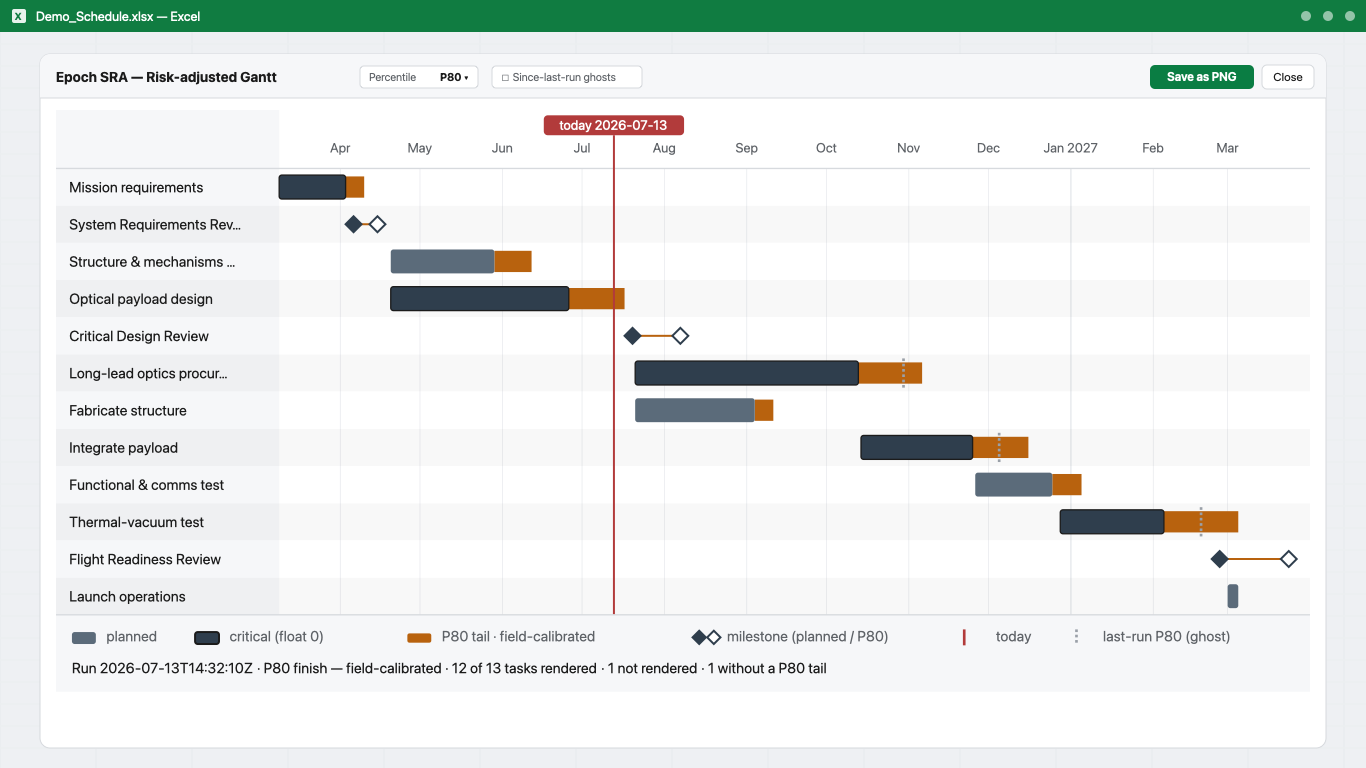
What you get
-
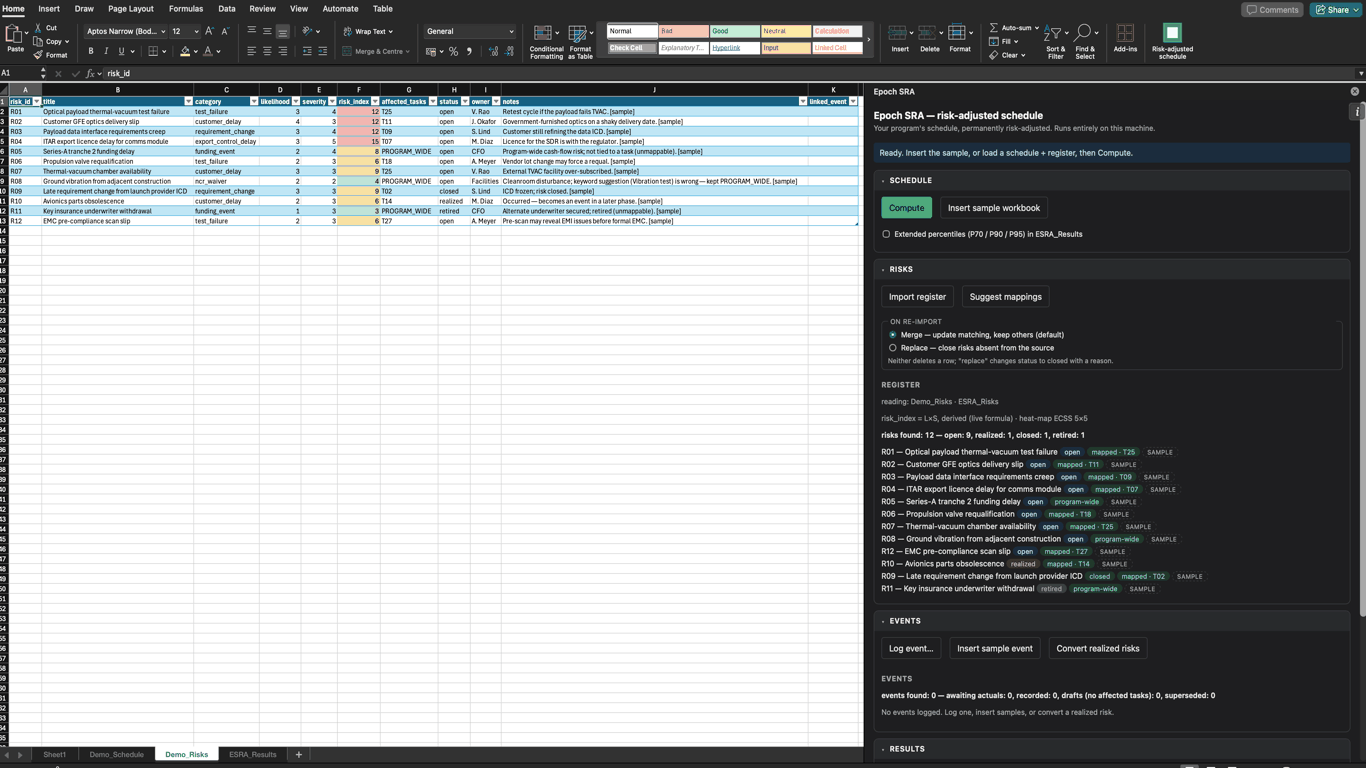
The risk register, in your workbook
Your register stays in the workbook as the
ESRA_Riskstable, scored ECSS 5×5. Therisk_indexcolumn is a live=L×Sformula under a conditional-format heat-map, so the colour cannot go stale the moment someone edits a likelihood. -
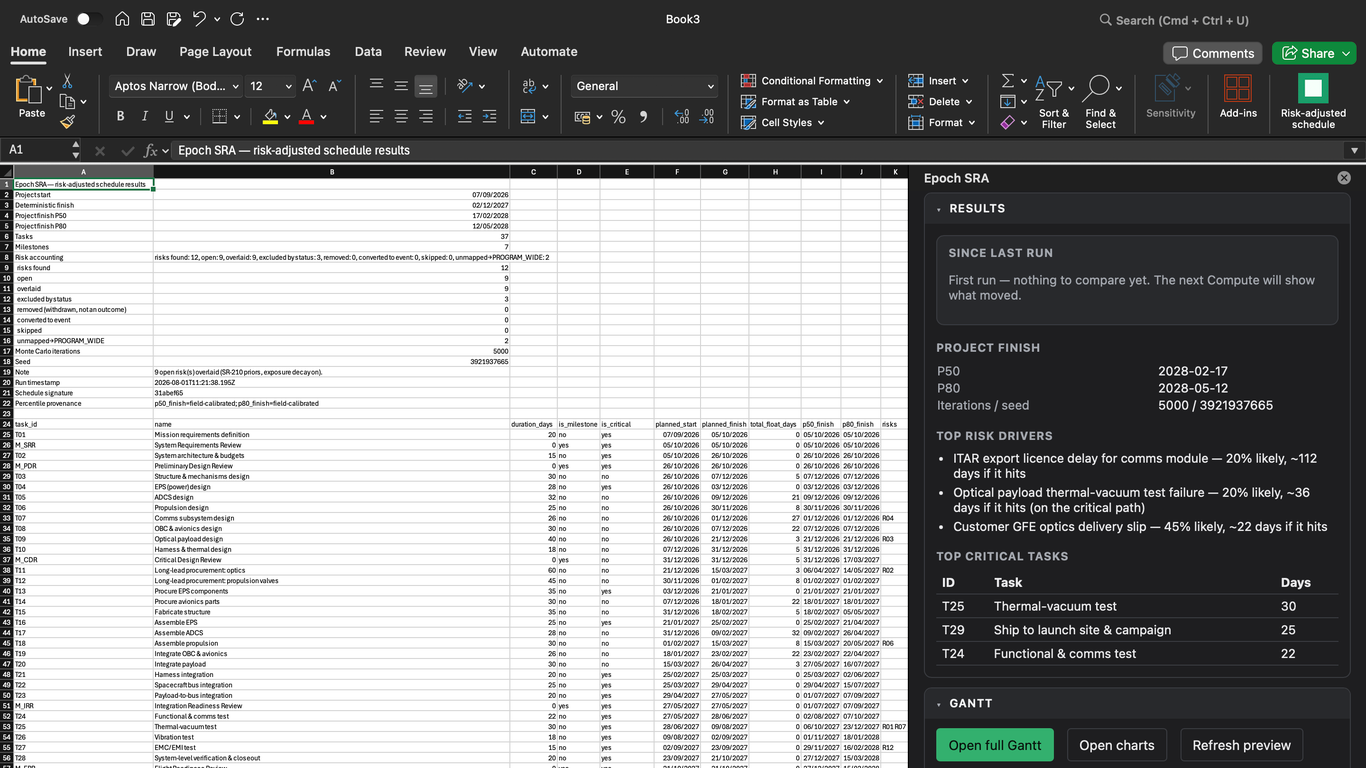
Results: P50, P80, and what moved
Compute writes the
ESRA_Resultssheet and reports the project finish at P50 and P80, the top risk drivers in plain language, and the tasks driving the critical path. Since last run shows what moved against the previous run, milestone by milestone, and attributes the change to the event that caused it. -
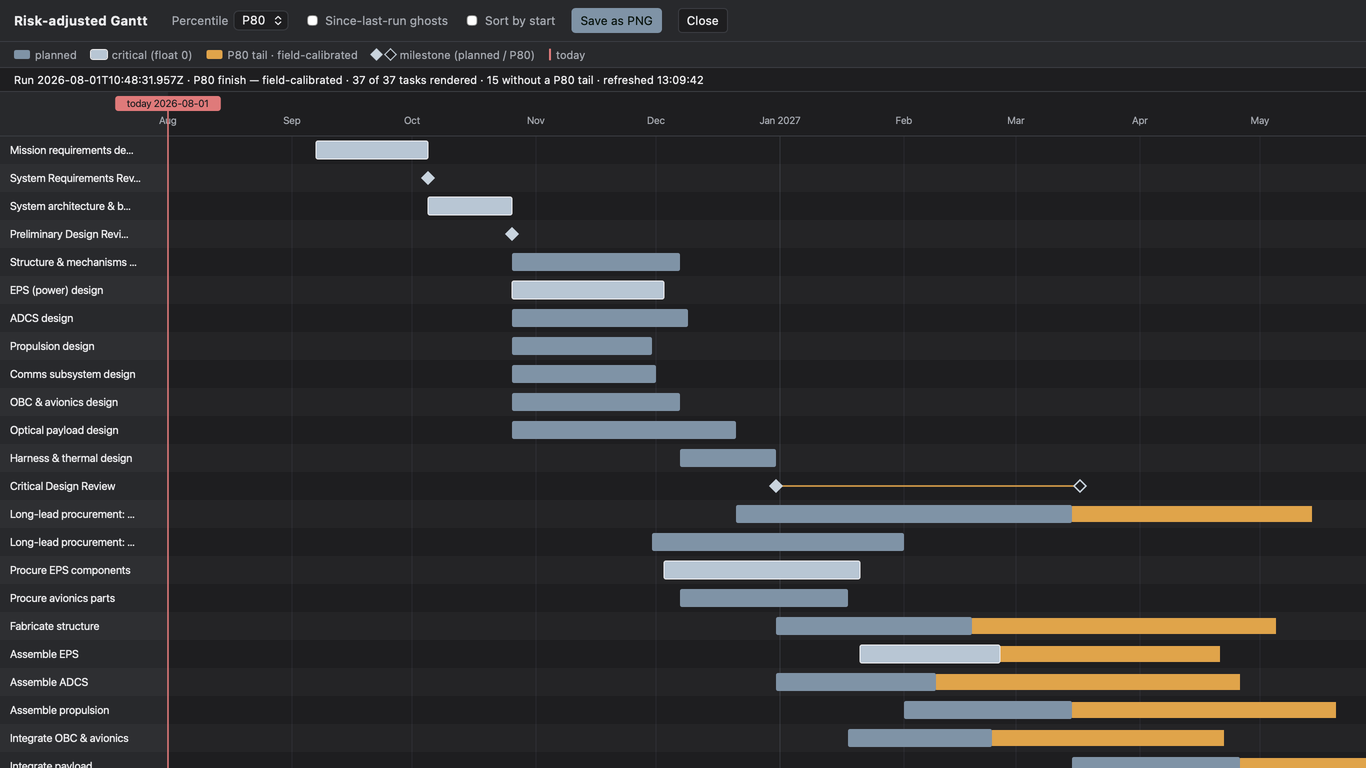
The risk-adjusted Gantt
Your planned bar, then the amber P80 tail: the exposure between the planned finish and the field-calibrated P80. Switch percentile, overlay the last run’s ghosts, or click any bar for its dates, total float, and tail in working days.
-
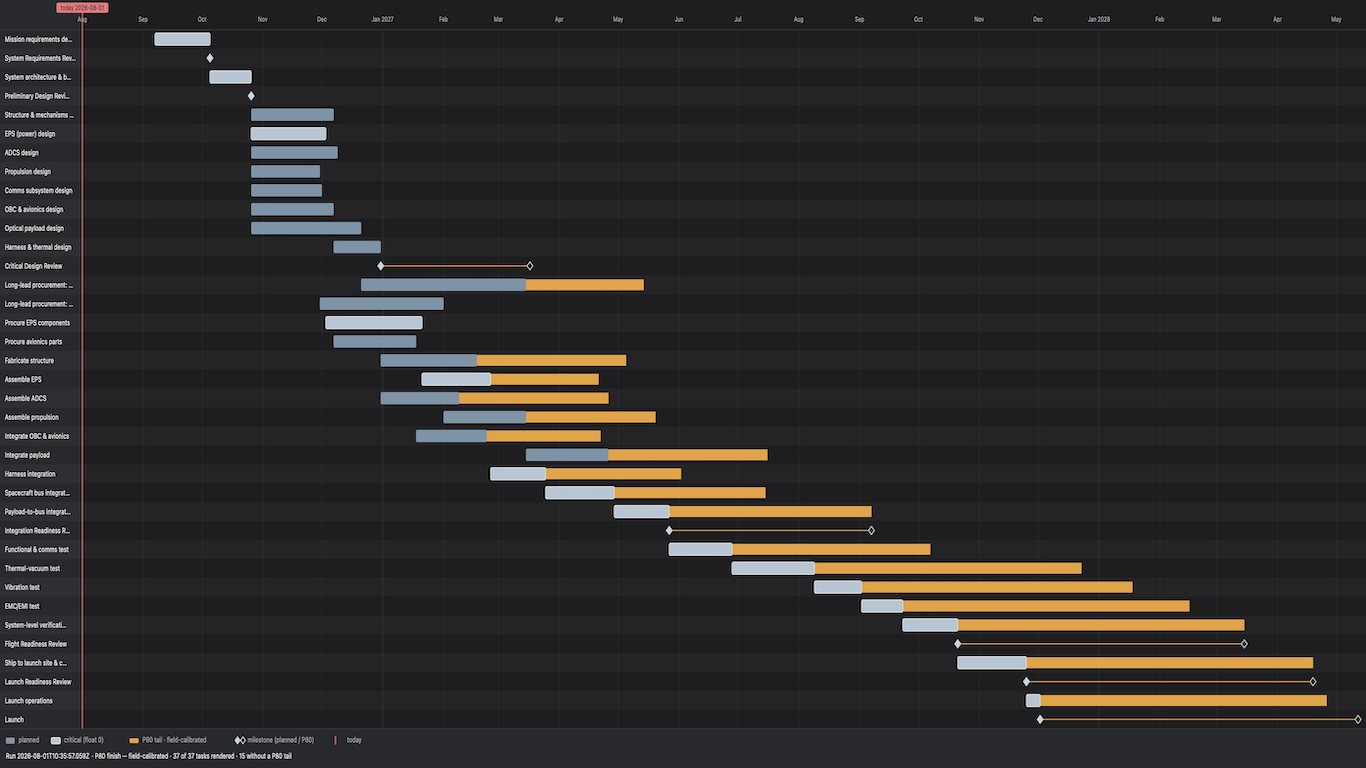
Export with its provenance attached
Save as PNG exports the whole program: here 37 tasks, mission requirements through launch. The run timestamp, the percentile, and its provenance are stamped inside the image, so a chart pasted into a review deck cannot lose the context it was computed under.
All screenshots: real output on a fictional demo program.
How it works
- Import your MS Project XML, or build the schedule table in Excel.
- Map risks from your existing register: proposed, never auto-linked.
- Compute: a calibrated Monte Carlo, on every update.
New here? Click See an example in the pane: the demo program (schedule + risk register) lands ready to Compute – a full analysis in three minutes, then run your own.
Measured, not promised
Epoch SRA’s risk priors are calibrated against completed real programs, not textbook defaults. Where a value is field-calibrated and where it is a structured estimate, the output says so.
How the numbers were measured – the figures and the calibration-v1 record, each tracing to a named repo record.
Epoch SRA is an Excel add-in that runs calibrated Monte Carlo schedule risk analysis; results land as plain Excel sheets in your workbook.
Monte Carlo on your live schedule
Every run is seeded and reproducible: the same schedule, register, and seed always give the same dates, and the seed is logged with each run. Recompute after any change: choose your iteration count – 5,000 by default, seconds to run.
Risks from your existing register, calibrated priors
Each risk’s 5×5 likelihood and severity map onto impact priors field-calibrated against replayed historical program actuals, not textbook defaults. Risk-to-task mappings are proposed for review, never auto-linked.
Excel-native: your results are ordinary sheets
The simulation and every results sheet are computed inside Excel and written to add-in-owned ESRA_ sheets in the same workbook. Your file remains an ordinary Excel file: versionable, archivable, reviewable by anyone with Excel – no viewer, no export step, no separate project file.
Schedule quality diagnostics
An analysis is only as good as the network under it, so Epoch SRA checks the schedule before it simulates it. Schedule quality checks aligned with the DCMA 14-Point Assessment (8 of 14 points implemented – see the guide), and informed by the GAO Schedule Assessment Guide and NASA Schedule Management Handbook practices, run on every Compute. The import report names every construct it could not translate – each link, with the reason – and a run carrying no uncertainty says so above the results instead of posing as a forecast.
Speaks space
The risk taxonomy is program-shaped: export-control and licensing delays, customer-side GFE deliveries, test failure and retest, long-lead item slips, launch-manifest changes, NCR/waiver. Risks are scored 5×5 likelihood × severity per ECSS-style convention, and impact priors are field-calibrated against replayed historical program actuals – not textbook defaults.
Pricing
Every plan starts in the add-in with a 7-day free trial: full-featured, no signup, no card. Licenses are per named user.
per seat / month
Renews monthly; cancel any time in the Stripe customer portal.
Buy monthlyper seat / year
Renews yearly; cancel any time in the Stripe customer portal.
Buy annualper seat + €350 / year maintenance
€1,650 first year, billed together. Keep your version forever; maintenance covers updates and support, and lapsing it blocks nothing.
Buy perpetualTeams and consultancies: contact us.
If Epoch saves your planner four hours a month, the annual plan has paid for itself.
Prices ex-VAT; VAT is added at checkout where applicable. License keys are delivered by email within 24 hours of purchase; no account is required. Comparing tools? Every schedule risk tool in one table, published facts only.